
TV Queue Display System for Clinics: How It Works & Why Indian Clinics Need One
A TV queue display turns waiting rooms calm and professional — here's how token systems, voice announcements in regional languages and QR registration work together.
 Anil KumarHealthcare IT Consultant14 May 20266 min read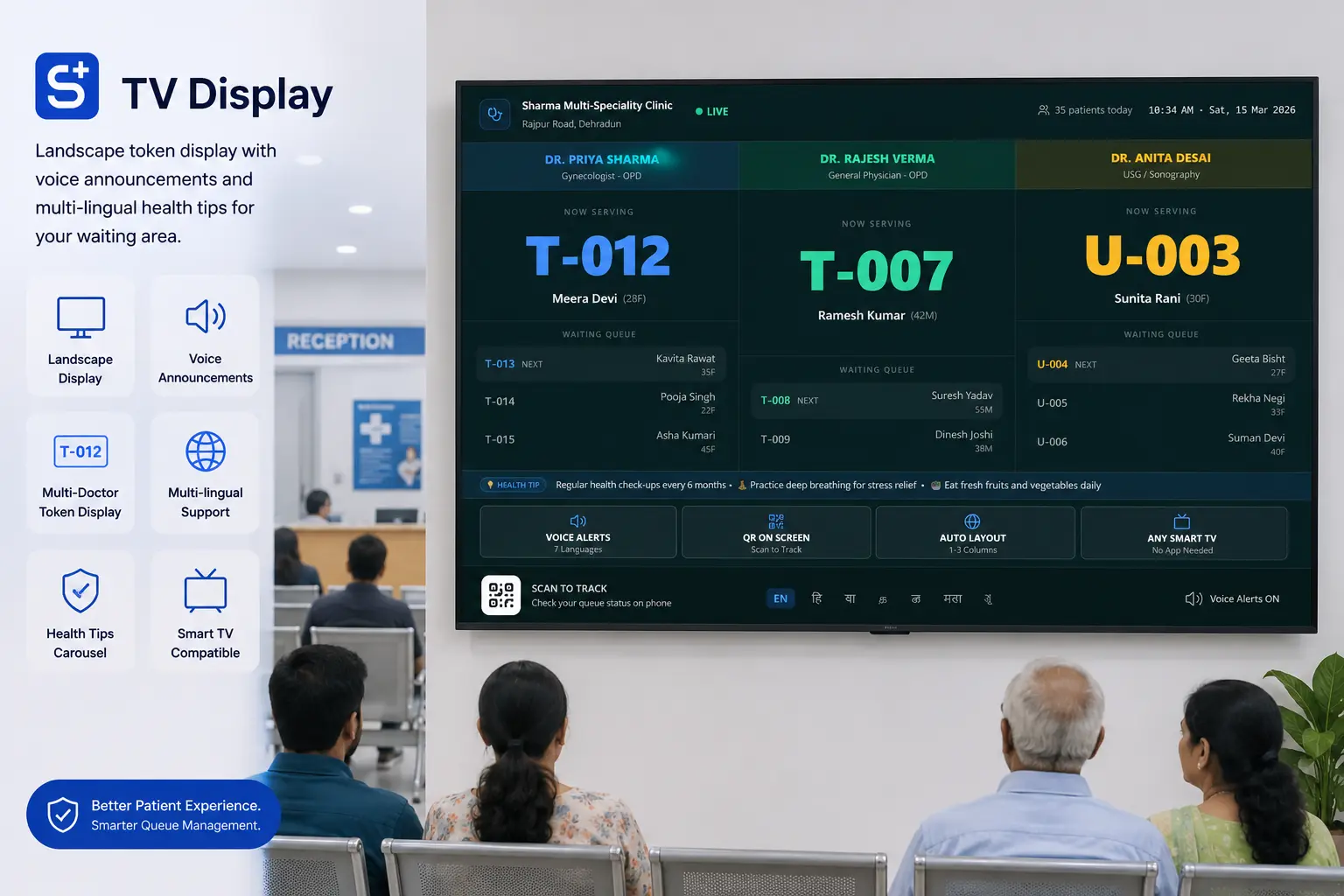
Walk into any modern Indian clinic and you''ll see a flat-screen TV displaying live token numbers, doctor names and now-serving information — often with a voice announcement in Hindi, Marathi, Tamil or other regional languages. This is a TV queue display system, and it has quietly become a must-have for clinics doing 30+ OPDs/day.
What is a TV queue display system?
A TV queue display is a full-screen view (running in any browser on a smart TV or Android stick) that shows the live OPD queue, current token being served, next 3–5 tokens, doctor-wise queues, and optional health tips or clinic branding. It pairs with a voice engine that announces token changes in the patient''s preferred language.
Why patients love it
- No more crowding around the reception desk to ask "kab number aayega?".
- Patients can step out to the medical store, washroom or for a snack and return on time.
- Voice announcements in the local language help elderly and less-literate patients.
- Reduces front-desk staff workload by 30–40%.
Why clinics love it
- Looks professional — patients perceive a 30%+ quality upgrade with the same staff.
- Can run health awareness tips between announcements (BP, diabetes, dengue, vaccination) — useful for community building.
- Multi-doctor clinics can show doctor-wise queues simultaneously.
- Pairs with QR patient registration so the entire walk-in flow becomes self-service.
Voice announcements that actually work
Indian patients respond to their local language. A good TV queue display system supports announcements in at least Hindi, English, Marathi, Gujarati, Tamil, Telugu and Kannada. The system should also handle browser autoplay restrictions silently — Smart Clinic''s TV display uses a Web Audio fallback so you never see "click to enable sound" pop-ups in the waiting room.
Setup is simpler than you think
- Connect a smart TV or plug an Android stick (₹2,000–₹4,000) into any TV''s HDMI port.
- Open a browser and enter your clinic''s TV display URL with a one-time TV code.
- Lock landscape orientation and full-screen.
- That''s it — token updates appear within 1 second of the receptionist clicking "Next".
What to look for when choosing a TV queue display
- Real-time updates (under 1-second latency) without page refresh.
- Voice announcements in 5+ Indian languages.
- Multi-doctor and multi-room support.
- Branded with your clinic logo and theme.
- Optional health awareness tips between announcements.
- Works on any TV with a browser — no proprietary hardware lock-in.
- QR patient registration that pairs with the queue.
How Smart Clinic''s TV display compares
Smart Clinic''s TV queue display ships natively with the OPD module — landscape-locked full-screen, real-time token updates, voice announcements in 7 Indian languages with silent autoplay fallback, doctor-wise queues, multi-room support, branded with your clinic logo, optional health awareness rotating tips, and QR-based patient self-registration. Start a free 7-day trial and see your TV display live in under 5 minutes.
Run your clinic with SmartClinic India
All-in-one clinic management software with OPD, IPD, pharmacy, billing & WhatsApp automation. Free 7-day trial.
Start Free TrialRelated articles
Healthcare IT Consultant
The Smart Clinic India editorial team writes about clinic management, GST billing, pharmacy, and digital healthcare best practices for Indian clinics and hospitals.