
Free Medical Certificate Generator (Sick Leave, Fitness & Vaccination) — India
Create a doctor-signed medical certificate PDF — sick leave, fitness or vaccination — in under 60 seconds. 100% free, no signup, bilingual (English & Hindi), print-ready A4 with 8 design templates.
 Anil KumarHealthcare IT Consultant23 July 20267 min read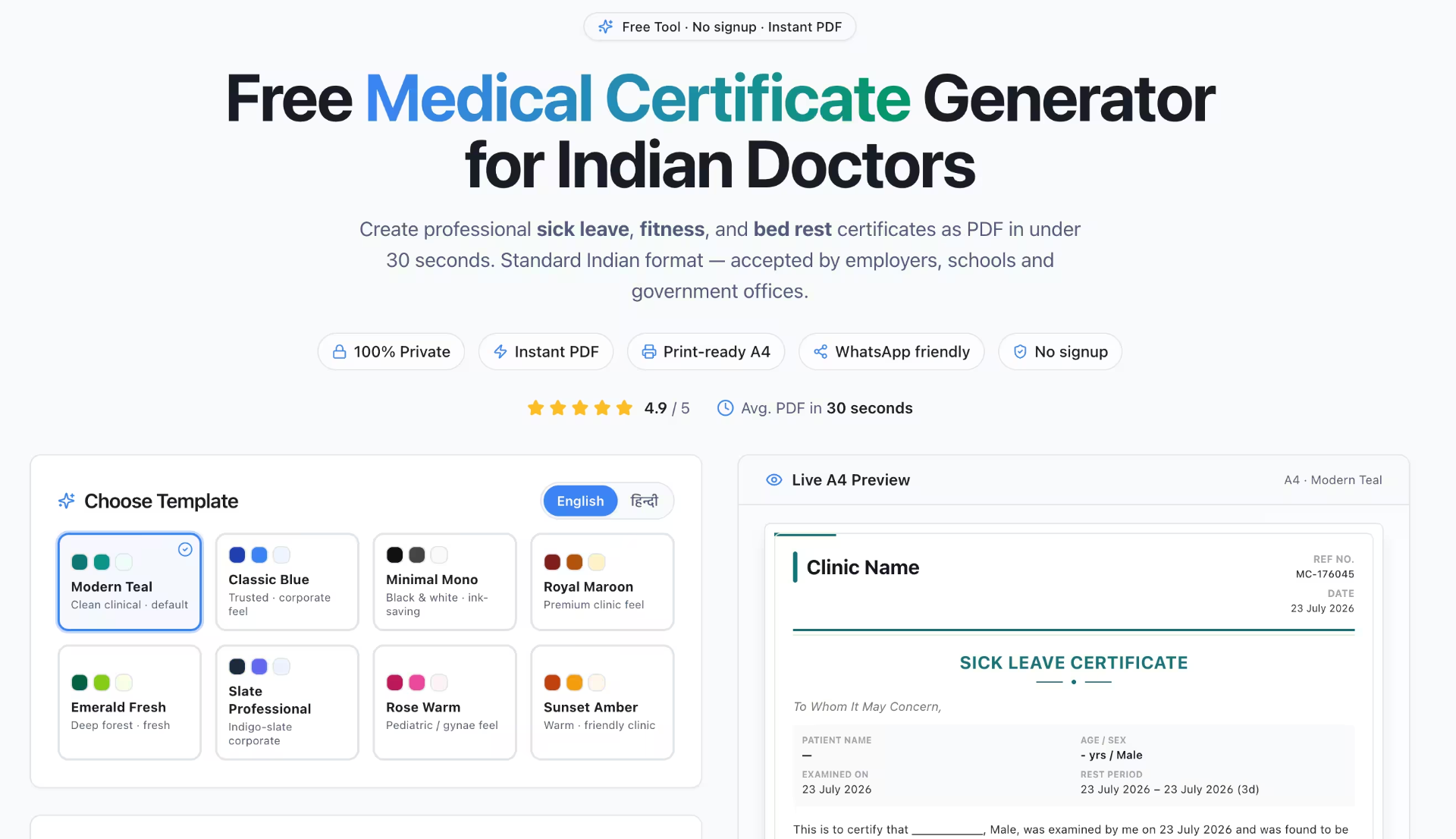
Every OPD ends with the same request — "Doctor sahab, ek certificate bana dijiye". Sick leave for an employer, fitness certificate before joining a new job, or a vaccination record for a school admission. Most doctors still handwrite these on a plain pad, and the result looks unprofessional next to a corporate letterhead.
To fix this, we built the Free Medical Certificate Generator — a browser-based tool that produces a clean, doctor-signed, A4 print-ready certificate PDF in under a minute. It''s 100% free, no signup, works on mobile and desktop, and now supports English & Hindi output with 8 professional design templates.
👉 Open the Free Medical Certificate Generator
What is a Medical Certificate?
A medical certificate is a written statement issued by a Registered Medical Practitioner (RMP) confirming a patient''s health status, illness, or fitness. In India, it is commonly required by employers, schools, courts, insurance companies, sports authorities, and visa offices. The National Medical Commission (NMC) and the earlier MCI Code of Ethics Regulations, 2002 (Section 1.3.3) require every certificate to include the doctor''s name, registration number, and signature.
Which certificates does this tool support?
The generator ships with three ready-to-use certificate types, each with the correct standard wording:
- Sick Leave Certificate — For patients who need rest from work or school. Includes diagnosis, examined-on date, rest period (from – to), and total days of leave advised.
- Fitness Certificate — For pre-employment, return-to-work, sports, or travel. Confirms the patient is physically and mentally fit to perform their duties.
- Vaccination Certificate — For school admissions, travel, or occupational requirements. Lists the vaccine name, dose, batch, and date administered.
Key features
- 100% Free & No Signup — Open the URL and start generating. No email, no OTP, no card required.
- Bilingual output (English + Hindi) — One-click language toggle. Certificate body, title, patient labels, dates and month names all render correctly in Devanagari.
- 8 design templates — Classic Emerald, Royal Indigo, Rose Gold, Slate Professional, Ocean Blue, Sunset Amber, Forest Green and Monochrome. Each affects primary color, accent bar and background tint of the certificate.
- Live A4 preview — See exactly how the PDF will print, in real time, as you type.
- Auto-generated Reference Number — Every certificate carries a unique REF NO for record-keeping and verification.
- Doctor details block — Name, qualification, registration number and clinic name are printed above the signature line — matching NMC guidelines.
- Print-ready A4 — Correct margins, professional typography, prints cleanly on plain paper.
- 100% Private — Runs entirely in your browser. Patient data is never uploaded, logged or stored on any server. Close the tab and it''s gone.
How to create a medical certificate in 4 steps
- Open the generator — Go to smartclinicindia.com/tools/medical-certificate-generator.
- Pick certificate type + template + language — Choose Sick Leave, Fitness or Vaccination. Pick one of the 8 design templates. Toggle English or Hindi.
- Fill patient & doctor details — Patient name, age, sex, examined-on date, diagnosis, rest period (if applicable), plus your name, qualification, MCI/State Council registration number and clinic name.
- Preview & Download PDF — Review the live A4 preview and click Download. Print on plain paper, hand it to the patient, or share on WhatsApp.
Who is this tool for?
- Solo GPs and family physicians who issue 5–20 certificates per day and want a consistent, branded format.
- Junior doctors, residents and RMOs handling walk-ins after hours or in casualty.
- Occupational health doctors conducting pre-employment fitness checks for factories, IT parks and construction sites.
- Pediatricians issuing school admission and vaccination certificates.
- Telemedicine consultants who need to email or WhatsApp a certificate PDF after a video consult.
- Small polyclinics that don''t have a full HIS but still want professional documentation.
Why this beats a Word template or plain-paper pad
Most doctors either scribble on a prescription pad or maintain a Word/Google Docs template. Both are painful:
- Word formatting breaks between devices — fonts shift, tables misalign.
- Plain-paper handwritten certificates look unprofessional and are easy to forge.
- Neither is truly bilingual — typing Devanagari in Word requires font juggling.
- Neither generates a REF NO for your records.
- Sharing on WhatsApp needs a "convert to PDF" extra step.
The generator solves all of this: identical output on every device, professional layout, unique REF NO, native Hindi rendering, and a one-click PDF.
Is a digitally-generated medical certificate legally valid in India?
Yes — provided it carries the doctor''s name, qualification, registration number and signature, and the patient''s identifying details. The NMC Code of Medical Ethics does not mandate any particular paper or format — the certificate can be printed, digitally issued, or hand-written, as long as the RMP takes responsibility for its contents. The generator produces the printable draft; you sign it (physically or digitally) and hand it over. Do not issue a certificate for a patient you have not personally examined — that is professional misconduct under Section 7.7 of the same regulations.
Privacy & patient data safety
Everything happens inside your browser. Patient name, diagnosis, age, dates — none of this is sent to any server, saved in a database, or shared with third parties. There are no analytics cookies tracking the form fields, no telemetry on the certificate content. If you''re worried about compliance (DPDP Act 2023, or hospital data-protection policies), this is the safest possible workflow — the data literally never leaves the device.
Language toggle — how the Hindi (Devanagari) version works
Click the हिन्दी pill in the "Choose Template" card. Every visible label switches immediately — title, patient block (रोगी का नाम, आयु/लिंग, जाँच की तिथि, विश्राम अवधि), REF NO (क्रमांक), DATE (तिथि), and the certificate body itself. The downloaded PDF uses the same Devanagari font (Noto Sans Devanagari) so nothing renders as boxes or question marks. Month names are localized too — "August" becomes "अगस्त".
Related free tools from SmartClinic India
The Medical Certificate Generator is part of a growing suite of 100% free clinical tools for Indian doctors:
- Free Prescription PDF Generator — A4 prescriptions with medicines, dose, and WhatsApp share.
- BMI & BSA Calculator — Instant body-mass index and surface area for drug dosing.
- Pediatric Dose Calculator — Weight-based dosing for common drugs.
- Rabies Vaccine Schedule (Essen/Zagreb) — Post-exposure prophylaxis planner.
From a free tool to a complete clinic system
If you find the certificate generator useful, take a look at the full SmartClinic India platform. It adds OPD & IPD management, pharmacy with GST billing, pathology & diagnostic reports, doctor-wise queues, WhatsApp automation, patient portal, and a proper certificate ledger that stores every certificate you''ve ever issued — searchable by patient, date or REF NO. But the free tool remains free, forever, and does not require you to upgrade.
Start now — no signup needed
Stop scribbling certificates on prescription pads. Generate a professional, doctor-signed certificate PDF — in English or Hindi — in the next 60 seconds.
👉 Open the Free Medical Certificate Generator
Frequently Asked Questions
Is the Medical Certificate Generator really free?
Yes. 100% free, no signup, no trial limits, no watermark, no hidden charges. Use it for as many certificates as you need.
Do I need to create an account?
No. Open the tool and start generating certificates immediately.
Is a certificate generated by this tool legally valid?
The tool produces a printable draft. Once you (a Registered Medical Practitioner) sign it and add your registration number, it carries the same legal weight as any doctor-issued certificate under the NMC Code of Medical Ethics.
Does it support Hindi?
Yes. There is a one-click English/Hindi toggle. The Hindi version renders natively in Devanagari using Noto Sans Devanagari, including localized month names and labels. The downloaded PDF also uses the Devanagari font, so nothing shows as boxes.
Where is the patient data stored?
Nowhere. Everything runs in your browser. We don''t store, log, upload or transmit any patient data you enter.
Which certificate types are supported?
Three types: Sick Leave Certificate, Fitness Certificate, and Vaccination Certificate — each with correct standard wording that you can further edit.
Can I add my clinic logo, name and registration number?
Yes. Doctor name, qualification, MCI/State Council registration number, and clinic name all appear on the certificate above the signature line.
Will the PDF print correctly on A4?
Yes. It is designed A4-first with correct margins and prints cleanly on plain paper without any browser adjustments.
Can I share the certificate on WhatsApp?
Yes. Download the PDF and attach it in WhatsApp Web/Business, or share directly from your phone browser using the OS share sheet.
How is this different from writing on a prescription pad?
The generated certificate is professional, consistent, carries a unique REF NO for your records, prints perfectly on A4, and is much harder to forge than a handwritten note. It also saves you 5–7 minutes per certificate.
Is there a template for CGHS / ESIC / court / insurance certificates?
Not yet. The current version covers the three most-issued certificates (Sick Leave, Fitness, Vaccination). Specialized formats like CGHS reimbursement, ESIC IP-104, and medico-legal certificates are on the roadmap — request them by writing to hello@smartclinicindia.com.
What is the free certificate generator?
A browser-based tool from SmartClinic India that produces sick-leave, fitness, and unfit-for-duty certificates as print-ready PDFs, complete with the doctor's registration number, signature block, clinic letterhead and a unique verification ID.
👉 Open the Medical Certificate Generator
How to make a certificate in 4 steps
- Fill doctor & clinic details — name, degree, registration number, clinic address.
- Enter patient details — name, age/sex, employer (if any).
- Enter diagnosis and duration — from/to dates auto-calculated.
- Preview & download PDF — signature, seal placement and verification ID are embedded.
Certificate types supported
- Sick leave certificate — for employer/school with diagnosis and rest period.
- Fitness certificate — for joining duty, sports, travel, wedding.
- Unfit for duty — temporary or permanent, with restrictions.
- Fit to fly — travel clearance certificate.
- Physical fitness certificate — pre-employment / medical exam.
Medico-legal requirements checklist
- Doctor's full name, qualifications and state/MCI registration number.
- Date of examination (not just certificate date).
- Clear diagnosis — vague terms like "unwell" are legally weak.
- Duration of rest with from-date and to-date.
- Doctor's signature and clinic seal.
- Unique certificate serial number for future verification.
Free tool vs full clinic system
| Feature | Free Tool | SmartClinic India |
|---|---|---|
| A4 PDF with signature & seal | ✅ | ✅ |
| Saved patient database (auto-fill) | — | ✅ |
| Serial numbering & audit trail | — | ✅ |
| Send to WhatsApp with 1 click | — | ✅ |
| Public QR verification link | — | ✅ |
👉 Create a free clinic account with QR-verified certificates
Frequently Asked Questions
Is a medical certificate from this free tool legally valid?
Yes — the legal validity of a certificate comes from the issuing doctor's qualifications, registration and signature, not the software. The tool generates the correct format; you sign it and it's valid.
Do I need to enter my MCI or state registration number?
Yes. A certificate without a registration number is legally weak and can be rejected by employers or courts.
Can I add my clinic letterhead and stamp?
Yes — you can upload your clinic logo and enter clinic address; the free tool renders them on the PDF.
Is the certificate stored anywhere?
No, all generation happens in your browser. Nothing is uploaded, logged or shared.
Can employers verify authenticity?
The free tool prints a unique certificate ID for reference. For public QR-based verification, upgrade to the full SmartClinic India system.
What size and format is the output?
A4, PDF, print-ready. Also renders correctly if shared via WhatsApp.
Related free tools
Run your clinic with SmartClinic India
All-in-one clinic management software with OPD, IPD, pharmacy, billing & WhatsApp automation. Free 7-day trial.
Start Free TrialRelated articles
Healthcare IT Consultant
The Smart Clinic India editorial team writes about clinic management, GST billing, pharmacy, and digital healthcare best practices for Indian clinics and hospitals.